Dijeweled Remastered
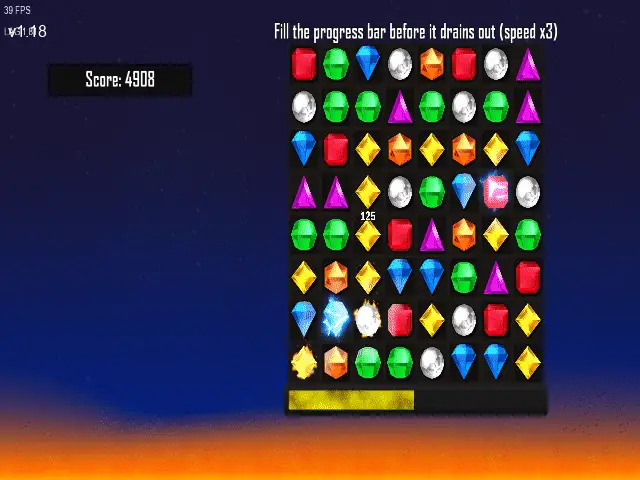
Dijeweled Remastered is a fan-made recreation of the Bejeweled series by LDinos. It brings back match-3 modes such as Classic, Zen, Blitz, Twist and Quests, and adds new gems, new modes and multiplayer.
Port Details
Genres
puzzle
Requirements
Porter
Downloads
35
Last Updated
2026-10-24
Rating
None
Miscellaneous
Ready to Run
Instructions
Ready to run out of the box, no additional files needed.
Additional Information
Notes
Thanks to LDinos for Dijeweled Remastered, a fan recreation of Bejeweled with new gems, new modes and multiplayer.
Controls
| Button | Action |
|---|---|
| D-Pad | Move the gem cursor / menu selection |
| A / B / X / Y | Swap the gem under the cursor toward that button's side: A right, B down, Y left, X up |
| A | Confirm in menus |
| A / B (Twist) | Rotate clockwise |
| X / Y (Twist) | Rotate counter-clockwise |
| Select | Zenify / pass |
| L1 | Replay |
| Start | Pause |
| Left Stick | Move mouse cursor |
| R1 | Left click |
| Start + Select | Quit |
Compile
Upstream's releases are YYC builds, which only run on the platform they were compiled for. The port builds the game from source as a VM (bytecode) build with YoYo Games' gm-cli, and runs it on gmloader-next with the official GameMaker 2024.13.1.242 Android runner. Everything below runs on aarch64 Linux.
1. gmloader-next
Built in Debian bullseye, as upstream CI does, to keep the glibc requirement at 2.27. The patch makes GML try/catch work (the runner throws C++ exceptions, and the loader stubbed dl_iterate_phdr), opens streamed sounds on seek, serialises asset reads across the audio thread, adds the libc calls the online and replay menus use (ioctl, fcntl, statvfs, if_indextoname, a bionic-layout getaddrinfo and others), and adds USB keyboard text entry (keyboard_lastkey, keyboard_lastchar, keyboard_string).
apt-get install -y --no-install-recommends python3 python3-clang build-essential pkg-config libsdl2-dev libzip-dev zlib1g-dev git ca-certificates
git clone --recursive https://github.com/JohnnyonFlame/gmloader-next.git
cd gmloader-next
patch -p1 < ../patches/gmloader-next-portmaster.patch
make -f Makefile.gmloader ARCH=aarch64-linux-gnu LLVM_FILE=/usr/lib/llvm-11/lib/libclang-11.so LLVM_INC=/usr/include/aarch64-linux-gnu/c++/10 -j$(nproc)
strip -o ../gmloadernext.aarch64 build/aarch64-linux-gnu/gmloader/gmloadernext.aarch64
cd ..
2. Node.js 24, gm-cli and FFmpeg
gm-cli fetches a guest licence, Igor and the GameMaker runtime by itself. GameMaker's asset compiler needs FFmpeg 5.1 or newer (it uses aresample=ochl=), which Ubuntu 22.04 doesn't ship.
mkdir -p tools/node24 tools/ffmpeg
wget -qO- https://nodejs.org/dist/v24.21.0/node-v24.21.0-linux-arm64.tar.xz | tar -xJ -C tools/node24 --strip-components=1
wget -qO- https://github.com/BtbN/FFmpeg-Builds/releases/download/latest/ffmpeg-n8.1-latest-linuxarm64-gpl-8.1.tar.xz | tar -xJ -C tools/ffmpeg --strip-components=1
export PATH="$PWD/tools/ffmpeg/bin:$PWD/tools/node24/bin:$PATH"
npm install -g @gamemaker/[email protected]
3. Patch and build the game
The renames fix three folders whose case doesn't match the project file, which only matters on case-sensitive filesystems. The patch replaces the Windows-only NekoPresence (Discord) extension with no-op functions, stops room creation code from reading depth through instance_create, which the VM rejects, moves the default swap buttons to their Nintendo-layout positions and Replay to L1, lets A press Continue on the results screen, draws its own mouse cursor, since there is no OS cursor under gmloader, stops Pause → Main Menu from leaking a full-screen surface every game, and adds the test driver (obj_autotest, inactive unless autotest.ini exists).
git clone https://github.com/LDinos/Dijeweled.git
cd Dijeweled
mv objects/cus_input_box objects/CUS_input_box && mv objects/CUS_input_box/cus_input_box.yy objects/CUS_input_box/CUS_input_box.yy
mv objects/obj_stats_m_button_down objects/obj_stats_M_button_down && mv objects/obj_stats_M_button_down/obj_stats_m_button_down.yy objects/obj_stats_M_button_down/obj_stats_M_button_down.yy
mv objects/obj_stats_m_button_up objects/obj_stats_M_button_up && mv objects/obj_stats_M_button_up/obj_stats_m_button_up.yy objects/obj_stats_M_button_up/obj_stats_M_button_up.yy
patch -p1 < ../patches/dijeweled-portmaster.patch
gm-cli compile --target=linux --runtime=vm [email protected] --cache-dir ../gmcache bej_temp_remaster.yyp
cd ..
4. Runner APK
The Android runner comes from the same runtime: --target=android installs the runtime's android module first and then stops, because the guest licence doesn't allow Android builds. options.ini is the Android one in patches/.
(cd Dijeweled && gm-cli compile --target=android --runtime=vm [email protected] --cache-dir ../gmcache bej_temp_remaster.yyp || true)
mkdir -p vm apk/lib/arm64-v8a apk/assets
unzip -q gmcache/build-gms2-linux-VM/output/bej_temp_remaster.zip -d vm
cp gmcache/runtimes-gms2/runtime-2024.13.1.242/android/runner/ProjectFiles/src/main/jniLibs/arm64-v8a/libyoyo.so apk/lib/arm64-v8a/
cp vm/assets/game.unx apk/assets/game.droid
cp vm/assets/audiogroup1.dat vm/assets/audiogroup2.dat vm/assets/*.ogg apk/assets/
cp -r vm/assets/challenges apk/assets/
cp patches/options.ini apk/assets/
cp Dijeweled/options/windows/splash/splash.png apk/assets/
(cd apk && zip -q -0 -r ../dijeweled.apk lib assets)
split -b 60000000 -d dijeweled.apk dijeweled.apk.part
5. Tests
tests/ holds the checks the port was verified with. lint_gml.py scans the patched source for code that fails under the VM and gmloader. run_autotest.sh runs every mode, quest and menu button on a device over SSH, using a driver object that only starts when the save folder contains autotest.ini. input_test.sh sends real pad presses and checks what the game receives.