Penumbra: Overture
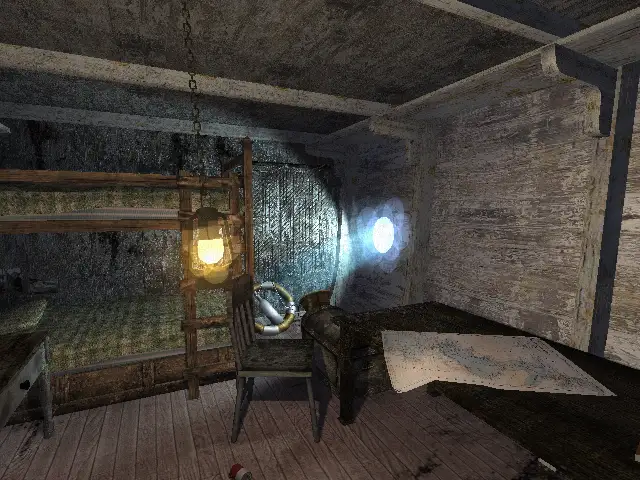
Penumbra: Overture is a first person survival horror game, emphasizing on survival and problem solving instead of mindless violence and gore.
Port Details
Genres
adventure
puzzle
Requirements
Porter
Downloads
107
Last Updated
2026-10-21
Rating
None
Miscellaneous
Instructions
Copy these folders and files listed below to roms/ports/penumbra/ from your game's folder: billboards/, lights/, particles/, config/, maps/, sounds/, core/, models/, textures/, fonts/, music/, graphics/, materials.cfg, resources.cfg.
Additional Information
Notes
Thanks to Frictional Games for creating Penumbra: Overture.
Boots and plays. Confirmed on RG40XX + ROCKNIX. Full playthrough and other CFWs untested.
[!IMPORTANT] This is a paid title. To play this port, you must have a legally purchased copy of the game on Steam or GOG.
Disclaimer
This project uses AI to write code and documentation. All code and documentation generated by the AI are reviewed and tested by a human.
Contents
Installing
1. Install the port
- Drop
penumbra.zipfrom the latest release into PortMaster’sautoinstalland run PortMaster, or - SSH:
harbourmaster install https://github.com/omka-1337/PenumbraOverture-PortMaster/releases/latest/download/penumbra.zip
Result: Penumbra Overture.sh + ports/penumbra/ (engine, shaders, OpenAL).
2. Copy the game across
Copy the folders and files listed below to roms/ports/penumbra/ from your game's folder.
[!TIP] For Steam, this is:
steam/steamapps/common/Penumbra Overtureor right-click the game in your library > browse local files.
billboards/   lights/      particles/    materials.cfg
config/       maps/        sounds/       resources.cfg
core/         models/      textures/
fonts/        music/
graphics/
Leave behind penumbra, penumbra.bin, lib/ and docs.
Do not overwrite rehatched/ — it holds the port’s shaders and overrides; without it the game draws nothing.
3. Play
Launch from Ports menu. First run writes settings (slightly slower).
Saves/settings live in ports/penumbra/.frictionalgames/ (survive port reinstalls).
If it fails, check ports/penumbra/log.txt (GL vendor line shows Mesa/Panfrost vs ARM blob).
Graphics switches
Set in the launch script before ./PenumbraOverture.
| Variable | Default | Effect |
|---|---|---|
HPL_SHADOW_BUDGET |
2 |
Point lights with shadow cube maps. 0 = biggest FPS gain (spot shadows only) |
HPL_POINT_SHADOWS |
on | 0 disables point-light shadows |
HPL_POST |
on | 0 skips post-process (no gamma/bloom, saves resolve) |
HPL_BLOOM |
config | Number overrides bloom; 0 disables bloom but keeps pass |
HPL_GAMMA |
config | Number overrides gamma |
HPL_BUMP |
on | 0 flat lighting (no normal maps) |
HPL_PARTICLE_SCALE |
1 |
Scales all particles |
Debug-only (not for everyday use): HPL_NO_LIGHTS, HPL_FRAME_TRACE, HPL_SCREENSHOT.
Controls
| Button | Key | Action |
|---|---|---|
| Left stick | WASD | Move |
| Right stick | Mouse | Look / drag (while Interact held) |
| R1 | LMB | Interact (hold + pull doors/drawers/valves) |
| L1 | RMB | Examine |
| A | R | Interaction mode |
| B | Space | Jump |
| X | G | Glowstick |
| Y | F | Flashlight |
| L2 / R2 | Q / E | Lean left / right |
| L3 / R3 | Shift / Ctrl | Run / Crouch |
| D-pad ←/→ | PgUp/PgDn | Cycle quick slots that hold items |
| D-pad ↑ | Home | Use selected quick slot |
| D-pad ↓ | N | Notebook |
| Select | Tab | Inventory |
| Start | Escape | Menu |
Face buttons follow device layout (A/B may be swapped). Mapping is in penumbra.gptk via gptokeyb — no in-game remapping.
Quick slots: D-pad cycles occupied slots (names the item); second button uses it. Never auto-uses.
Right-stick acceleration: short nudge = precise, hold = ramps to full speed (~0.5 s).
mouse_scaleinpenumbra.gptk(higher = slower; default 6144)HPL_MOUSE_ACCEL=<top>:<ramp>:<start>in launch script — lower start if overshooting, raise if crawling.
Compile
Engine lives in HPL1 Fledged; this repo has game sources, packaging and launch script. Clone side-by-side.
Device (PortMaster container):
docker run --privileged --rm tonistiigi/binfmt --install arm64
./build-arm64.sh          # → build-arm64/PenumbraOverture (7 MB, glibc ≥ 2.29, libGLESv2)
./deploy.sh               # push binary + shaders + script over ssh
# override address if needed:
[email protected] ./deploy.sh
Package for PortMaster:
./build-openal-arm64.sh   # OpenAL without sndio
./package.sh              # → build-arm64/penumbra.zip
Releases built by .github/workflows/release.yml on arm64 runners. Tag v1.0 publishes; manual run builds without release.
Desktop:
cmake -S . -B build && cmake --build build
./play.sh
See port/README.md for device layout. capture.sh grabs a single frame for renderer comparison.
License
Port files: GPL